
03:Memory Store记忆存储机制
在上一篇文章中,我们介绍了LangGraph的持久化机制,涵盖了检查点、线程等核心概念及其使用方法。
本文将会介绍LangGraph中的另一种持久化机制:记忆存储(Memory Store)。
一、什么是Memory Store
之前介绍的线程和检查点已经可以完成持久化工作,为什么还需要**记忆存储(Memory Store)**呢?
检查点保存的数据与特定线程(Thread)绑定,因此只能在同一个线程内访问。例如,使用 thread_id_a 无法获取到 thread_id_b 的检查点数据。如果我们想让持久化的数据能在不同的线程间共享,那就需要用到记忆存储了。
例如,在聊天机器人应用中,同一个用户在一个会话中存储的记忆(如用户偏好),通过Memory Store可以在其他会话中被读取和使用,从而实现跨线程的数据共享。
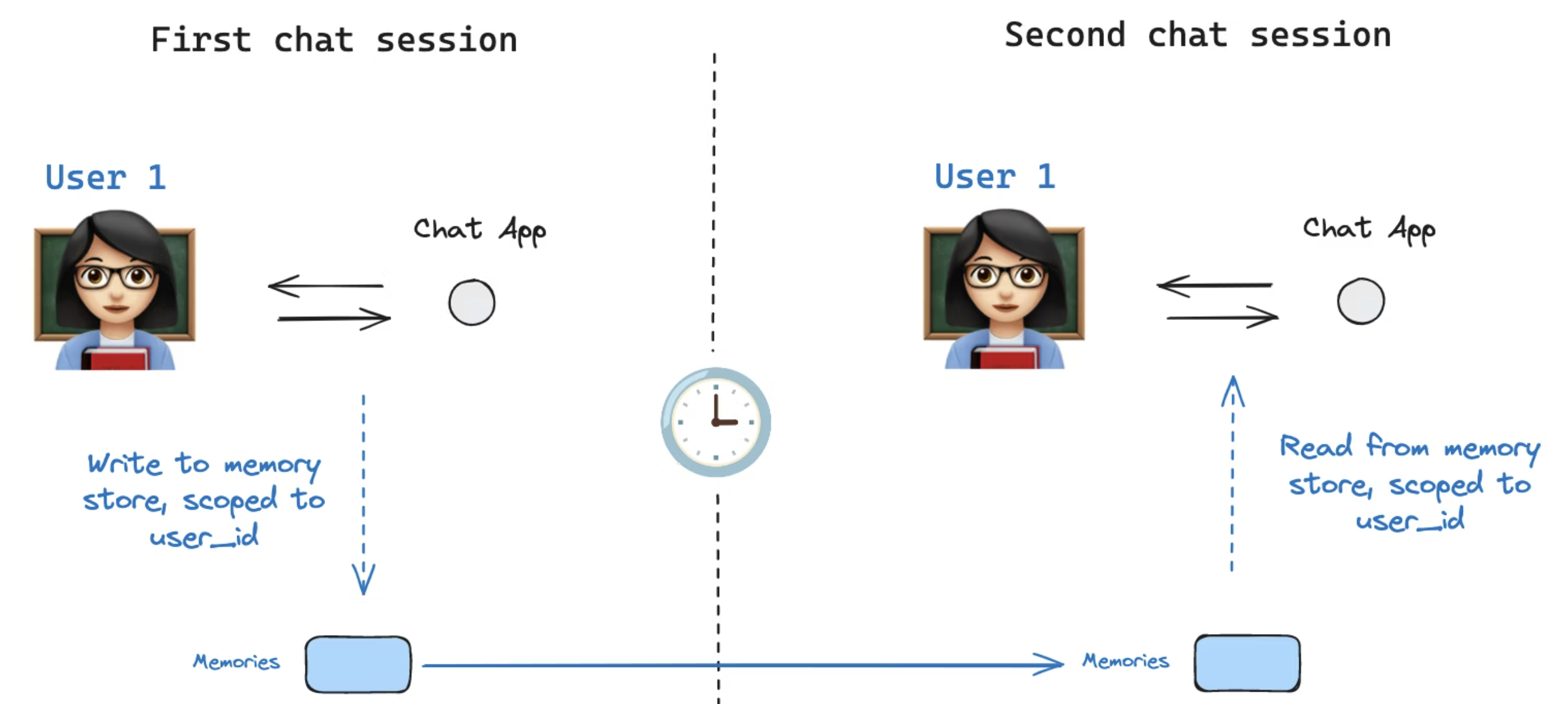
二、Memory Store基础用法
在介绍如何在LangGraph使用记忆存储(Memory Store)之前,首先通过记忆存储的具体实现InMemoryStore类,来了解一下Memory Store本身的用法。
首先,创建一个InMemoryStore对象用于存储数据,InMemoryStore将数据存储在内存中,适用于开发和测试。
in_memory_store = InMemoryStore()对于生产环境,LangGraph提供了RedisStore、PostgresStore等持久化存储后端。
2.1 put()存储数据
向InMemoryStore中存储记忆信息需要使用put方法,并且需要指定三个参数:所属命名空间 (namespace)、记忆信息的唯一键 (key)、要存储的记忆信息 (value)。namespace需传入一个元组,key是唯一标识符,value要求是一个字典,该字典的键(key)应为字符串类型,值(value)可以是任意类型的数据。
代码示例如下,实例中,使用history_messages和user_id组成的元组作为命名空间,并模拟人类和AI对话的历史消息信息。
user_id = "1"
namespace = ("history_messages", user_id)
memory_id_1 = str(uuid.uuid4())
memory_id_2 = str(uuid.uuid4())
in_memory_store.put(namespace, memory_id_1, {"role": "human", "content": "你好,我是大志,你是?"})
in_memory_store.put(namespace, memory_id_2, {"role": "ai", "content": "你好,我是OpenAI开发的聊天助手ChatGPT"})
2.2 get()获取数据
通过put方法存储到InMemoryStore中的数据,可以通过get方法获取,获取时需要传入命名空间和唯一标识。
memory_item = in_memory_store.get(namespace, memory_id_1)
print("============get方法获取记忆数据=============")
print(memory_item)
执行结果如下,输出的结果是一个Item对象,Item对象就是记忆信息存储的结构。
============get方法获取记忆数据=============
Item(namespace=['history_messages', '1'], key='d6617385-98be-460d-9462-4f08d2f685b9', value={'role': 'human', 'content': '你好,我是大志,你是?'}, created_at='2025-12-23T03:32:00.316586+00:00', updated_at='2025-12-23T03:32:00.317107+00:00')
Item类包含如下属性:
- namespace:数据所属命名空间(以列表形式存储)
- key:该记忆的唯一标识
- value:记忆信息
- created_at:记忆信息创建时间
- updated_at:记忆信息更新时间
2.3 search()检索数据
除了可以使用get()方法获取特定的记忆数据外,还支持使用search方法进行检索,该方法可以检索出指定命名空间下的所有记忆数据。
memory_items = in_memory_store.search(namespace)
print("============search方法检索记忆数据列表=============")
print(memory_items)
执行结果如下:
============search方法检索记忆数据列表=============
[Item(namespace=['history_messages', '1'], key='d6617385-98be-460d-9462-4f08d2f685b9', value={'role': 'human', 'content': '你好,我是大志,你是?'}, created_at='2025-12-23T03:32:00.316586+00:00', updated_at='2025-12-23T03:32:00.317107+00:00', score=None), Item(namespace=['history_messages', '1'], key='1f5a5eff-eae4-4b66-9375-f1d541e62af7', value={'role': 'ai', 'content': '你好,我是OpenAI开发的聊天助手ChatGPT'}, created_at='2025-12-23T03:32:00.317155+00:00', updated_at='2025-12-23T03:32:00.317157+00:00', score=None)]
2.4 语义检索
InMemoryStore还支持根据语义进行记忆信息的检索。语义检索指的是通过自然语言查询的语义相似度来匹配,而非简单的关键词匹配。它同样使用 search 方法,但需要传入 query 参数。
在使用语义检索前,还需要安装一个依赖,否则会抛出错误。
pip install numpy代码示例如下,要使用语义检索,在创建InMemoryStore时,必须要配置index属性,其中包括要使用的文本嵌入模型、向量的维度、以及要进行文本嵌入的字段,
在下方示例中,我们对content字段进行了文本嵌入。其中,fields参数指定了要对哪些内容进行文本嵌入以构建向量索引。content 表示对 value 字典中的 content 字段值进行嵌入;特殊字符 $ 表示对整个 value 字典对象进行嵌入。
在使用search方法进行检索时,可以指定命名空间、查询文本、限制返回几条数据。
import uuid

import dotenv
from langchain.embeddings import init_embeddings
from langgraph.store.memory import InMemoryStore

dotenv.load_dotenv()

# 1.创建InMemoryStore对象
in_memory_store = InMemoryStore(
    index={
        "embed": init_embeddings("openai:text-embedding-3-small"),  # 文本嵌入函数
        "dims": 1536,  # 向量维度
        "fields": ["content", "$"]  # 要进行文本嵌入的字段
    }
)

# 2.向InMemoryStore对象中添加数据
user_id = "1"
namespace = ("history_messages", user_id)
memory_id_1 = str(uuid.uuid4())
memory_id_2 = str(uuid.uuid4())
in_memory_store.put(namespace, memory_id_1, {"role": "human", "content": "你好,我是大志,你是?"})
in_memory_store.put(namespace, memory_id_2, {"role": "ai", "content": "你好,我是OpenAI开发的聊天助手ChatGPT"})

# 3.语义检索
memory_items = in_memory_store.search(namespace, query="大志", limit=1)
print("============search语义检索=============")
print(memory_items)
执行结果如下:
============search语义检索=============
[Item(namespace=['history_messages', '1'], key='f2725325-00e0-4e84-8382-73b440a74628', value={'role': 'human', 'content': '你好,我是大志,你是?'}, created_at='2026-02-02T16:59:16.326165+00:00', updated_at='2026-02-02T16:59:16.326700+00:00', score=0.5965221079901719)]
三、在LangGraph中使用Memory Store
在介绍完Memory Store的基本用法后,我们将通过一个保存用户对话历史的案例,来学习如何在LangGraph中使用Memory Store。
首先加载env配置,并定义llm对象。
dotenv.load_dotenv()

# 1.创建llm
llm = init_chat_model(
    "gpt-4o-mini",
    temperature=0
)定义State图状态数据,包含图运行中产生的消息列表messages和通过Memory Store检索到的聊天历史。
# 2.定义State
class MessagesState(TypedDict):
    # 图运行的消息列表
    messages: Annotated[list[AnyMessage], operator.add]
chat_history: Annotated[list[dict[str, str]], operator.add]接下来,定义LangGraph的三个节点,load_memory_node、llm_node、save_memory_node,三个节点的作用分别是从记忆存储中加载用户聊天历史、调用llm、保存本次对话到Memory Store。
首先,第一个节点load_memory_node,通过config获取user_id并拼接好namespace,进行记忆检索,将检索到的记忆保存到State中的chat_history。
# 3.定义加载记忆节点
def load_memory_node(
        state: MessagesState,
        config: RunnableConfig,
        store: BaseStore
):
    user_id = config["configurable"]["user_id"]
    namespace = ("chat_history", user_id)

    # 1.检索记忆信息
    memories = store.search(namespace)

    # 2.更新到State
    history_messages = []

    for memory in memories:
        history_messages.append({"role": memory.value["role"], "content": memory.value["content"]})

return {"chat_history": history_messages}第二个节点llm_node,首先将之前节点读取的chat_history格式化成字符串,并构造一个SystemMessage。然后将SystemMessage与状态中的最新HumanMessage一同作为参数调用LLM。LLM返回AIMessage,该消息会自动添加到State中的messages列表中。
# 4.定义llm节点
def llm_node(state: MessagesState, config: RunnableConfig, store: BaseStore):
    """调用LLM节点"""
    system_prompt = """你是一个智能助手,根据用户提出的问题认真回复
    当前用户历史记忆如下:{chat_history}
    """
    chat_history_str = ""
    for item in state["chat_history"]:
        chat_history_str += f"{item['role']}: {item['content']}\n"
    system_message = SystemMessage(content=system_prompt.format(chat_history=chat_history_str))

    ai_message = llm.invoke([system_message, *state["messages"]])

    return {"messages": [ai_message]}
第三个节点,将State消息列表messages中的AI消息存储到Memory Store中。下次同一用户调用图时,便可读取到本次对话的历史信息。
# 5.定义存储记忆节点
def save_memory_node(
        state: MessagesState,
        config: RunnableConfig,
        store: BaseStore
):
    user_id = config["configurable"]["user_id"]
    namespace = ("chat_history", user_id)

    # 5.1 保存AIMessage
    for message in state["messages"]:
        if isinstance(message, AIMessage):
            store.put(
                namespace,
                str(uuid.uuid4()),
                {
                    "role": message.type,
                    "content": message.content
                }
            )

    return {}
接下来,构建图、节点、边。
# 6.构建图
graph = StateGraph(MessagesState)

graph.add_node("load_memory", load_memory_node)
graph.add_node("llm", llm_node)
graph.add_node("save_memory", save_memory_node)

graph.add_edge(START, "load_memory")
graph.add_edge("load_memory", "llm")
graph.add_edge("llm", "save_memory")
graph.add_edge("save_memory", END)接下来,创建InMemoryStore对象,并将其作为store参数传入图的compile方法,在运行图时传入人类消息和config配置,在两次对话中传入相同的user_id,那么第二次对话就可以读取到第一次会话的历史聊天记录,从而实现了记忆功能。
# 7.编译并运行图
in_memory_store = InMemoryStore()
agent = graph.compile(store=in_memory_store)

config = {"configurable": {"user_id": "1"}}
state = agent.invoke({"messages": [HumanMessage(content="你好,我是大志你是?")]}, config)

print("================================== 第一次对话 ==================================")
for message in state["messages"]:
    message.pretty_print()

print("================================== 第二次对话 ==================================")
state = agent.invoke({"messages": [HumanMessage(content="你知道我是谁吗?")]}, config)
for message in state["messages"]:
    message.pretty_print()
执行结果如下,第二次对话中,AI能正确地回答出用户的名字,证明第二次对话中成功读取了历史对话消息。
================================== 第一次对话 ==================================
================================ Human Message =================================

你好,我是大志你是?
================================== Ai Message ==================================

你好,大志!👋
我是 **ChatGPT**,一个由 OpenAI 训练的智能助手(当前使用的是 **GPT‑5** 模型)。
我可以帮你解答问题、学习新知识、写作、编程、聊天解闷等等。

很高兴认识你 😊 有什么我可以帮你的吗?
================================== 第二次对话 ==================================
================================ Human Message =================================

你知道我是谁吗?
================================== Ai Message ==================================

知道的,你是大志 😄。

不过除了你告诉我的信息,我并没有其他关于你的私人记忆或身份信息。如果你想,我可以帮你记住你的一些偏好或爱好,在聊天中更贴近你的习惯。

你希望我记住些什么吗?
四、总结
本文介绍了 LangGraph 的另一种持久化能力Memory Store(记忆存储)。
首先,我们介绍了什么是Memory Store,明确了它与线程(Thread)和检查点(Checkpoint)的本质区别: 检查点解决的是单线程内的数据存储,而 Memory Store 关注的是跨线程数据共享。
接下来,介绍了InMemoryStore的基础用法,并通过一个带记忆的聊天Agent案例讲解了在LangGraph如何使用InMemoryStore。